
The stock on the shelf and the balance in Intecrop can sometimes drift apart. This can happen because a delivery or an application was never captured, was captured with the wrong quantity, or because stock was spilled or lost. When you do a stock take, enter what you found as a correction, and the balance becomes what you counted.
A correction sets the balance to the figure you enter. It does not add to it or take from it. Enter what is on the shelf, not the difference. If Intecrop says 37 L and you count 35 L, you enter 35 — not 2, and not −2.
Open the chemical
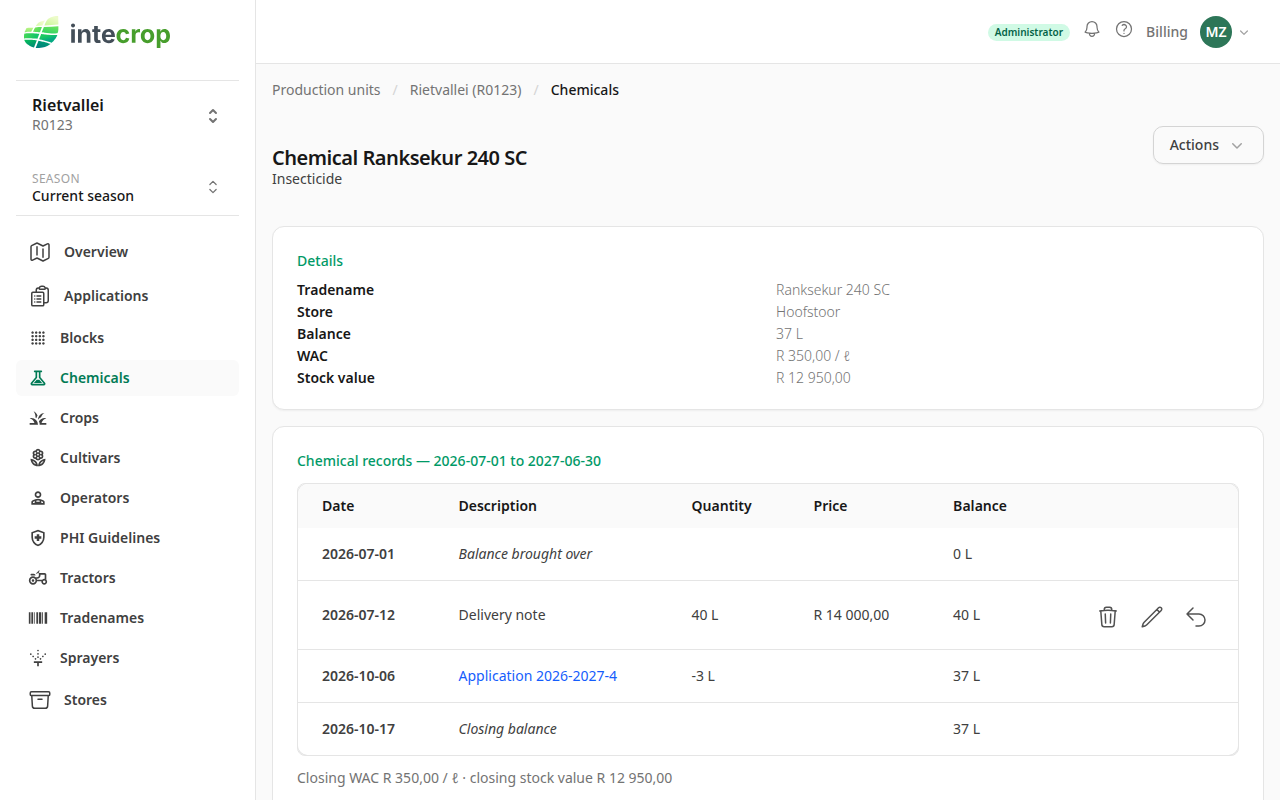
On the Chemicals page, click the chemical you counted. The Details card shows the balance Intecrop has worked out from the records, the average cost per unit (WAC) and the stock value. Under it, the records that got it there.
Enter the correction
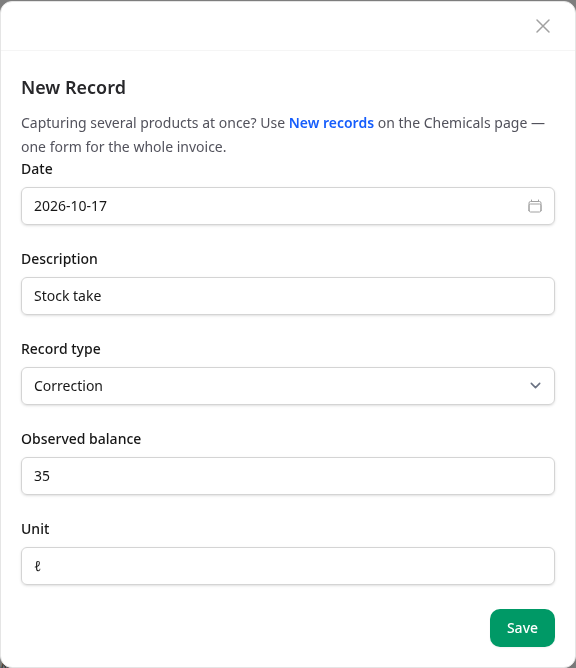
Open Actions and choose New record. Set Record type to Correction, and the form changes:
- Quantity becomes Observed balance — the total you counted.
- Unit is fixed to the chemical's own unit. Count in that unit: four full 20 L drums and 7 L in an open one is 87.
- Price goes away. A stock take is not a purchase, so no money goes in or out.
For Date, use the day of the stock take. A date in the future is refused. For Description, something you will recognise later — "Stock take" will do.
Press Save.
What the correction changes
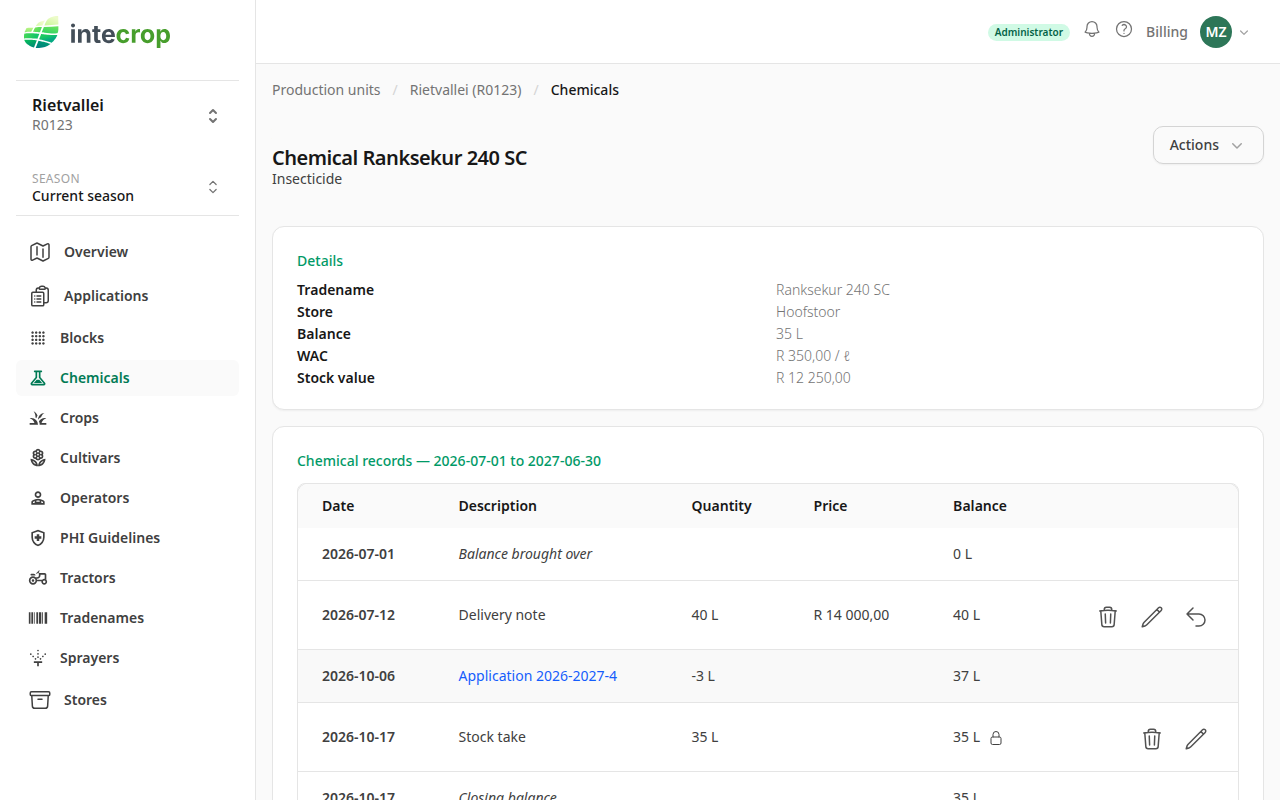
The balance is now 35 L. The new row shows a padlock next to its balance — that marks a correction — and its Quantity is the 35 L you counted, not the 2 L difference.
The average does not move. It stays at R 350,00 per litre, so the stock value follows the quantity down: 35 × R 350,00 is R 12 250,00, where it was R 12 950,00 before. The 2 L that went missing leave at the average, the same as stock an application uses. See How chemical costs are worked out.
Older records no longer change the balance
After a correction, the balance starts again from the figure you entered. Records dated before the correction are kept, but they no longer change the balance from the correction on. (The chemical's page lists only the season you are looking at; anything older is summed up in its Balance brought over row.)
This also applies to a delivery you capture late. Say you do a stock take this month, and then find an invoice from last month. Dated on the day it arrived, the delivery comes before the correction, so it does not change the balance: the drums it brought were already on the shelf when you counted. If the delivery has a price, though, it still changes the average, and so the value of the stock you counted.
Records dated after the correction add to or take from the figure you entered, as you would expect.
Other records on the day of the stock take
Records on the same day are worked through in the order they were captured. So anything captured on that day after you saved the correction is added to or taken from the figure you entered:
- A delivery captured after the correction is added to it. That is right if it arrived after you counted. If it was already on the shelf when you counted, it is counted twice.
- An application comes out of the store when its confirmation is finalised, so one finalised after the correction comes off the figure you entered. That is right if it went out after you counted. If it went out before, it is taken off twice.
A move between stores or a return to the supplier works the same way.
Capture the day's deliveries and finalise the day's applications first, then enter the correction. If the correction is already in, delete it and enter it again. Changing it with the pencil does not help: it keeps its place in the order.
Taking a finalised confirmation back to draft and finalising it again also takes its stock out after the correction. If you change an application from the day of a stock take, enter the correction again afterwards.
If the books showed nothing, the stock is valued at nothing
A correction keeps the average the chemical already had. If the balance was zero or less before the correction — usually because deliveries were never captured — there is no average to keep. Unless another of your stores holds the same product, in the same unit, at a price, the stock you counted is valued at R 0, and the next priced delivery gets averaged in with stock that cost nothing.
The fix is to capture the missing deliveries, with their prices, on the dates they arrived. Dated before the correction, they leave its balance as it is. Once they bring the balance before the correction above zero, the correction takes their average.
A mistake in the correction
Use the pencil on the correction's row to change it, or the bin to remove it. Fix the correction you got wrong rather than entering a second one after it.
A stock take of the whole store
For a full stock take, go to the Chemicals page, open Actions and choose New records. Set Record type to Correction: one date and one description over as many rows as you counted, each with its chemical and its observed balance in that chemical's own unit. See Capture an invoice for how the form works.
More than one store
A chemical in two stores is two chemicals in Intecrop, each with its own page, and a correction sets only the balance of the one you enter it on. Count each store on its own.
A correction is not the way to record stock that moved. To move stock to another of your stores, use Move to another store under Actions — it is there once your farm has more than one store. To send product back, use Return to supplier — the curved arrow on the delivery's row. That takes the money off as well, and a correction cannot.
A new chemical's initial balance
When you add a chemical, the Initial Balance is optional. Leave it, its Date and its Unit blank if you have not counted the chemical. If you fill them in, the initial balance is saved as a correction on that date.
So a 0 is not the same as blank: it says you counted nothing, and like any correction it hides the deliveries dated before it. A 0 dated today, followed by last year's invoices, leaves the balance at 0.