
Sometimes product goes back: the wrong product was delivered, a drum arrived damaged, or you ordered more than you used and the supplier takes the rest back. The supplier sends a credit note, and the stock and the money it was carried at have to come off your books.
Record that as a return, and make it from the receipt the product came in on. The receipt is what the return undoes: it knows how much came in and what you paid for it, so Intecrop can work out the credit for you and stop you taking back more than you bought.
What a return is not for
- Moving stock to another of your own stores is a move, not a return. Use Move to another store on the chemical's Actions menu.
- A stock take — writing down what you counted — is a correction. A correction sets the balance to the figure you enter; a return takes an amount off.
Find the receipt
Open the chemical from the Chemicals page. Every receipt in its Chemical records table has a curved arrow at the end of its row — Return to supplier. Only a receipt has one.
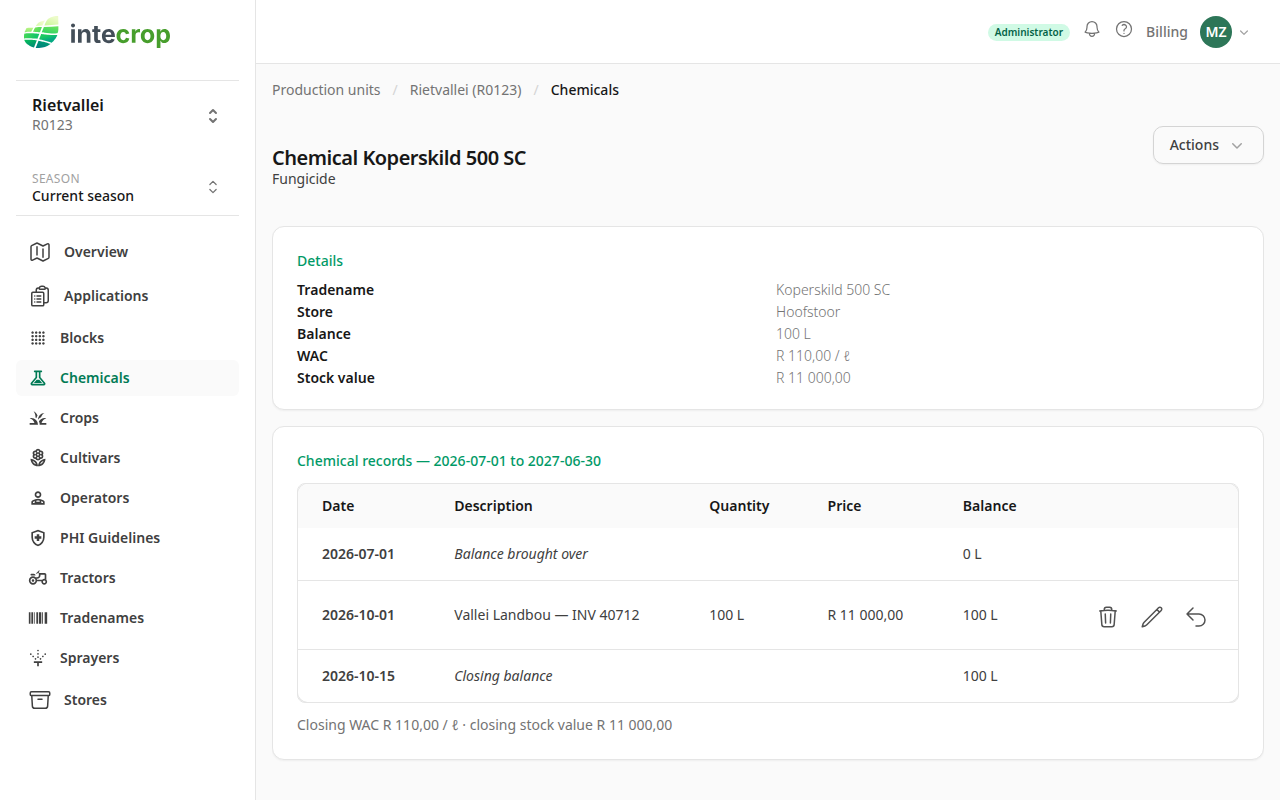
The table shows the records of the season you are looking at. If the delivery came in during an earlier season, change the Season in the side menu to find it.
Fill in the return
Click the arrow. The form opens filled in with the whole receipt: its quantity,
its price, and a description that starts with Return: followed by the
receipt's own.
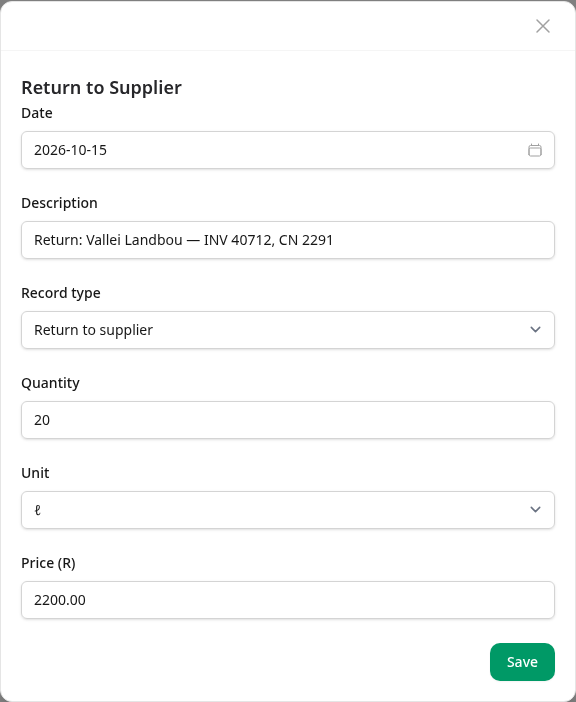
- Date — the date on the credit note, or the day the product went back. It cannot be before the receipt's date, and it cannot be in the future.
- Description — add the credit note's number, so the return can be found against the paper later.
- Quantity — what went back. The form always opens on the receipt's whole quantity, even when part of it has already been returned, so type the amount that went back this time.
- Unit — you can return in a different unit of the same kind as the one you bought in. It is converted for you.
- Price (R) — the credit, worked out for you. See below.
Press Save.
How the price is worked out
The price follows the quantity, pro rata from the receipt: the share of the receipt's price that those units cost. In the example the receipt is 100 ℓ for R 11 000, which is R 110 a litre, so returning 20 ℓ fills in R 2 200. A share that does not come out to whole cents is rounded up to the next cent.
Check it against the credit note. If the supplier credited less — they kept a handling fee, say — type the amount they actually credited. Once you have typed a price yourself, changing the quantity no longer changes it, so set the quantity first.
If the receipt has no price, there is nothing to work a share out of: the price opens empty and stays empty. Type the credit off the credit note. Left blank, the return takes the stock off at the average cost, like an application does.
A credit with nothing sent back — the supplier lowered the price after the fact — is a return with a quantity of 0 and the credited amount as the price.
What the form will not accept
More than is left on the receipt. All the returns against one receipt together cannot take back more than it brought in. Try to return 120 ℓ of the 100 ℓ delivery and the quantity is refused:
is more than is left to return on the receipt (100 ℓ of 100 ℓ)
The first figure is what is still left to return after any earlier returns against the same receipt.
More per unit than you paid. A credit of R 2 500 for 20 ℓ is R 125 a litre, more than the R 110 the receipt paid, and the price is refused:
is more per unit than the receipt (R 110.00 per ℓ)
Less than that is fine. A credit with a quantity of 0 can be anything up to the receipt's whole price.
What the return does to your stock
The return shows in the table on the date you gave it, with its quantity and price negative: stock and money going out. A return dated in a later season than its receipt shows in that season's table, not under the receipt.
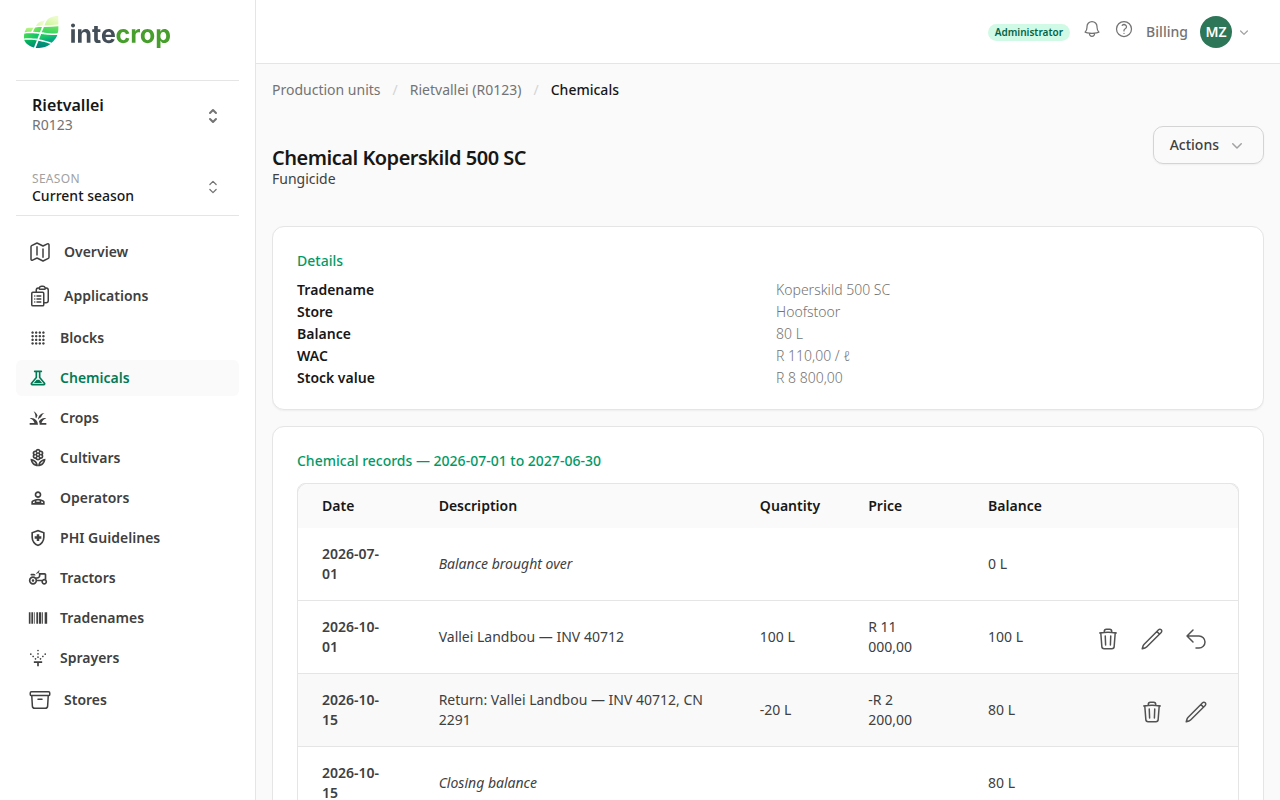
In the example the balance goes from 100 L to 80 L and the stock value from R 11 000 to R 8 800. The average cost — WAC on the Details card, R 110 a litre — does not move: the 20 ℓ went back at exactly what they cost, so what is left is carried at the same price as before. A credit for less than the full share leaves the average a little higher, because you are still paying for the difference. For how the average itself is worked out, see How chemical costs are worked out.
Afterwards
- To change a return, use the pencil on its row. It is held to the same rules as when you made it, but the edit form does not work the price out again: if you change the quantity, change the price to match.
- A receipt with a return against it cannot be deleted. Delete the return first.
- Editing the receipt cannot undo its returns: it will not let you date the receipt after one of them, or lower its quantity below what was returned. Nor will it let you change its price or quantity so that a return would credit more per unit than the receipt now paid.
Return to supplier is also one of the record types on the New record form. A return made there is not tied to any receipt, so none of the receipt checks above apply to it and nothing works out its price. Start from the receipt instead.